Birth Chart (Kundli)
Make an accurate Vedic birth chart in moments
- Available on
- Web
- Answers in your language
- Light & dark
What is the Birth Chart (Kundli)?
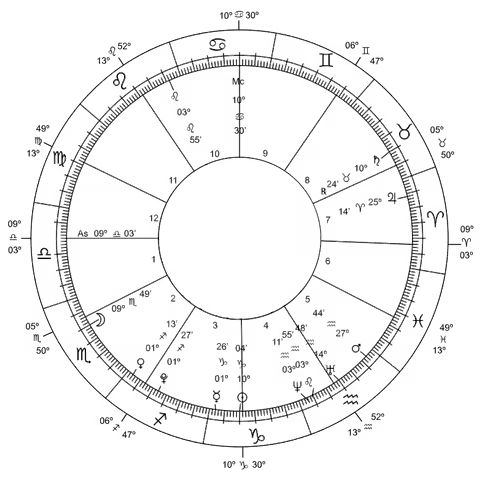
Your kundli is where Vedic astrology begins: an exact picture of where each planet stood at the moment of your birth. Astro GPT works out your chart on the sidereal zodiac with the Lahiri ayanamsa, using the open-source astronomy-engine library for planet positions, and the results have been checked against well-known charts. You get the Lagna (D1) chart, the Moon (Chandra) chart and the Navamsa (D9), each with positions down to the degree and minute. Choose between the North Indian and South Indian way of drawing it. The planet table lists every graha's sign, degree, nakshatra and pada and marks any that are retrograde. Alongside it you see all twelve houses, your Vimshottari maha and antar dashas and the panchang of your birth moment. It is the chart an astrologer would draw by hand, ready in seconds.
How it works
Pick a person
Your own chart opens first; move to anyone in your family profiles with a single tap.
Pick your chart style
North Indian or South Indian layout, both drawn from the very same birth details.
Look through the details
Planets, houses, the Navamsa, your dashas and the panchang of the moment you were born.
Ask the AI about it
Open the chat and ask about any placement you notice; the AI already has your chart in front of it.
Key Highlights
Three Key Charts
Lagna (D1), Navamsa (D9) and the Moon chart: the three a Vedic astrologer looks at first.
North and South Indian Styles
See your chart in the traditional layout you know best. Both are worked out in exactly the same way.
Precise Calculations
Positions for all 9 Vedic grahas are calculated to the minute of arc and checked against known charts.
A Clear Planet Table
Each planet's sign, degree, nakshatra, pada and retrograde status, laid out so you can read it at a glance.
Vedic, Sidereal Charts
Charts use the sidereal zodiac, the Lahiri ayanamsa and whole-sign houses. Western astrology is covered in the site's guides.
Ask About Your Chart
Curious about a placement? Take it to the chat and the AI will explain what it says about you.
What is free and what you pay for
Free
- Every chart, in both styles, for you and every person you save
- The Navamsa and Moon charts along with the Lagna chart
- Planet and house tables, your dashas and the panchang of your birth moment
Costs coins
- Only the questions you put to the AI astrologer are paid for
Prices are decided in the app and can change, and the button always shows the exact amount before you pay. See current prices →
Benefits
- ✨Get a professional-grade Kundli without visiting an astrologer, drawn instantly and free on your device
- ✨Compare Vedic and Western charts side by side for the same birth data
- ✨Understand your planetary strengths, weaknesses, and house lordships
- ✨See the chart of any saved family member or friend from the same account
- ✨Jump from the chart into a chat and ask the AI about any planet's effects
Ways people use it
- Generating your first Kundli to understand your astrological makeup
- Checking planetary positions for a newborn child
- Comparing North and South Indian chart styles for study
- Verifying chart accuracy against a manually calculated Kundli
- Exploring divisional charts (D9 Navamsa) for marriage and destiny insights
Questions people often ask
- Which birth details are needed?
- Your date, exact time and place of birth. The time matters most, because it sets the ascendant and the houses. If you do not know it, tick "I don't know the birth time": the chart is then drawn for noon, and the lagna and houses should be taken as approximate.
- How does a Vedic chart differ from a Western one?
- Vedic astrology follows the sidereal zodiac (tied to the actual stars), whereas Western astrology follows the tropical zodiac (tied to the seasons). As a result your Vedic sign usually sits about 23 degrees behind your Western one. The app's charts are Vedic; the site's Western astrology guides explain the tropical side.
- Can I keep charts for my family?
- Yes. Family profiles let you add relatives or friends, up to five people besides yourself. Each profile stores that person's birth details, and their full chart opens with one tap.
- Which divisional charts are shown?
- Astro GPT shows the Lagna (D1) chart and the Navamsa (D9), along with the Moon (Chandra) chart. These are the charts astrologers turn to most for a general life reading, for marriage and for the emotional side of a person.
- Do I have to pay for the chart?
- No. Charts are worked out right in your browser and cost nothing, for you and for every person you save. You only pay when you ask the AI astrologer a question about the chart.
Related features and guides
Try Astro GPT for free
Sign up free and your welcome bonus lets you try the AI astrologer, for yourself or anyone in your family. Charts, matching scores and the Panchang are always free.
All Features
Begin your journey with Astro GPT.
Ask your first question and see what your kundli says about the road ahead.